/* Flying Css3 menu www.bloggertrix.com*/
ကိုကို(နည္းပညာ)မွႀကိဳဆိုပါတယ္ ေလ့လာခဲ့သမွ်ကို ျပန္လည္မွ်ေဝတာပါ
RSS
Showing posts with label window 8. Show all posts

Windows 8 Manager 1.0.8

 Windows 8 Manager 1.0.8 | 11,01 Mb

window 8 သံုးေနၾကတဲ့ သူငယ္ခ်င္းေတြအတြက္ ကြန္ျပဳတာျမန္ႏႈန္းျမွင့္

ေပးမဲ့ software ေလးပါ။ အရင္ကေတာ့ window 7  manager တင္ေပးဖူးပါတယ္

အခု႔ေတာ့ window 8 ကလဲ ေတာ္ေတာ္မ်ားမ်ားလဲ အသံုးျပဳ႕ေနၾကၿပီျဖစ္တဲံ အတြက္တင္ေပးလိုက္ပါတယ္

ကလစ္တခ်က္ႏွိပ္ရုံနဲ႔စက္ကို သန္႔ရွင္းေရး လုပ္ေပးမယ့္ေဆာ့ဝဲေတြ အဖြင့္အပိတ္ ကို 

အရင္ထက္ျမန္လာေစမယ္၊ registry အမွားေတြကို လိုက္ရွင္းေပးမယ္၊အင္တာနက္ကြန္နက္ရွင္

ကိုျမွင့္ေပးမယ့္ အားလံုးကိုျပည့္စံုေစမယ္ ေဆာ့ဝဲေလးမို႔ ျပန္လည္မွ်ေဝေပးလိုက္ပါတယ္

အထဲမွာ keymaker ေလးလဲ ပါတာမို႔ Fullversion လုပ္လို႔လြယ္ပါတယ္ဗ်ာ

သံုးခ်င္တယ္ဆိုေအာက္မွာ ေဒါင္းပီး သံုးလိုက္ေတာ့ေနာ္


  • Digg
  • Del.icio.us
  • StumbleUpon
  • Reddit
  • RSS

Classic Start 8 - 1.0 Final

Classic Start 8 - 1.0 Final

Windows 8 အသံုးျပဳသူမ်ားအတြက္ Start Menu ေလးေပၚေစမယ့္ ေဆာ့ဝဲလ္ေလးပါ..။ Classic Start 8 ေဆာ့ဝဲလ္ေလးကို က်ေနာ့္ Blog မွာ မတင္ဖူးေသးလို႔ ဒီေနာက္ဆံုးထြက္ေလးကို တင္ေပးလိုက္ပါတယ္..။ ဒီေကာင္ေလးကို Install ထည့္ျပီးတာနဲ႔ အေပၚက ပံုအတိုင္း ေပၚေနမွာပါ..။ အရင္တုန္းကလည္း Windows 8 အတြက္ Start Menu ေလးေတြ တင္ေပးခဲ့ဖူးပါတယ္..။ ဒါေလးကေတာ့ ေနာက္တမ်ိဳးပါ..။ လိုအပ္တဲ့ သူမ်ားကေတာ့ ေအာက္ကလင့္ကေန ေဒါင္းယူလိုက္ပါဗ်ာ..။ ဖိုင္ဆိုဒ္ကေတာ့ 1.3 MB ရွိပါတယ္..။
 dropbox>> Download    >>Download 

  • Digg
  • Del.icio.us
  • StumbleUpon
  • Reddit
  • RSS

Windows 8 Gadgets


Windows 8 အတြက္ gadgets မ်ားပါ desktop မွာ ဟိုတင္ ဒီတင္ ႀကိဳက္သူမ်ား အတြက္ေပါ့ဗ်ာ

ေအာက္မွာေဒါင္းပါ
Mediafire password= 1001

  • Digg
  • Del.icio.us
  • StumbleUpon
  • Reddit
  • RSS

Microsoft Windows 8 Professional (X86|X64) Final Retail AIO

Microsoft Windows 8 Professional (X86|X64) Final Retail AIO
Language: English
Mirrors: Putlocker | Fileuplo.de | BillionUploads
 
အခ်ိန္ေပးျပီးေဒါင္းခ်င္ရင္ေတာ့ မႈရင္းလင့္ေလးေပးလိုက္ပါတယ္ 
ဆိုင္ေတြမွာ၀ယ္လိုက္တာကေတာ့စိတ္ခ်မ္းသာပါတယ္ 

**HERE IS Microsft Windows 8 Professional Final Retail English x86/x64 Version, After activation No Watermark included and the proof is below.
2# Update Link download (19-01-2013)
Mirror via Fileuplo.de
Mirror via BillionUploads
Rar password: koskomputer.blogspot.com
Installasi
1. Unpack
2. Burn ISO
3. Install the windows
4. Use Loader to activate
5. Enjoy

2# Info
1. Links download Interchangeable
2. Total part: 12 / 350 MB
3. Total file  : 3.83 GB

  • Digg
  • Del.icio.us
  • StumbleUpon
  • Reddit
  • RSS

Windows 8 aio16 in 1_iso အလိုရွိသူမ်ား အတြက္


ဒါကေတာ့ Windows 8 AIO 16 in 1 ပါ။ အလိုရွိသူမ်ား ျမန္ျမန္ downloads ဆြဲထား လိုက္ ပါ။  ေအာက္က လင့္မွာ downloads ယူလိုက္ပါ။ 4.37 G ရွိပါတယ္။ iso ဖိုင့္နဲ႕ တစ္ဖိုင့္ ထဲ ရွိပါတယ္။ အိမ္သာနက္ လိုင္းေကာင္းဖို႕ေတာ့ လိုတယ္ေနာ္....


ဝင္ဒိုး 8 Activaror က
၀င္ဒိုး 8 Activator downloads links က ဒီမွာပါ 

Windows 8 AIO 16 in 1
Windows 8 x86
Windows 8 N x86
Windows 8 Pro x86
Windows 8 Pro VL x86
Windows 8 Pro N x86
Windows 8 Pro with Media Center x86
Windows 8 Enterprise x86
Windows 8 Enterprise N x86
Windows 8 x64
Windows 8 N x64
Windows 8 Pro x64
Windows 8 Pro VL x64
Windows 8 Pro N x64
Windows 8 Pro with Media Center x64
Windows 8 Enterprise x64
Windows 8 Enterprise N x64

  • Digg
  • Del.icio.us
  • StumbleUpon
  • Reddit
  • RSS

Offline Installers Of .NET Framework 4.5, 4.0, 3.5, 3.0 & 2.0

.Net Framework ကိုသိၾကမွာပါ... ကြန္ျပဴတာအတြက္ မရွိမျဖစ္ လိုအပ္ပါတယ္... Offline Installer ေလးေတြမို႔ Share ေပးလိုက္တာပါ......

As many of the new Microsoft Windows applications are developed using .NET Framework, it is becoming mandatory to install .NET Framework on our personal computers. Microsoft provides .NET Framework installer as a free download available to everyone. But it is an online installer. That means, initially we have to download a small piece of installer and upon starting the installation process the installer automatically connects to Microsoft servers and downloads the required components and completes the installation.

The online installers works great as long as we have internet connectivity always. But many of us required offline installer to install the software on computers not connected to internet, to save the bandwidth while installing on many computers, etc.

I gathered a set of links on Microsoft servers from where we can download the offline installers of .NET Framework 4.0, 3.5, .NET Framework 3.5 Service Pack 1, .NET Framework 3.0 and .NET Framework 2.0

NET Framework 4.5 Setup

NET Framework 4.0 Setup

NET Framework 3.5 Setup

.NET Framework 3.5 Setup Service Pack 1

Download .NET 3.5 Service Pack 1

NET Framework Client Profile Offline Installer

  • Digg
  • Del.icio.us
  • StumbleUpon
  • Reddit
  • RSS

window 8 Themes

/windows-8-themes-free.com 

 ဒီမွာသြားၾကည့္ပါ

France Theme for Windows 8

Arc de Triomphe de l’Étoile
Absorb the wonders of France, known for its famous architectural style, best represented by the one-and-only, Eiffel Tower, with this iconic theme for Windows 8. France is also a country famous for its wine, baking, perfumes and cuisine. The window color for this theme is dull pink and contains a set of 6 wallpapers at a resolution of 1900 x 1200 each. From the stunning interior of the Paris Opera House to a grand view of the Arc de Triomphe de l’Étoile, this free theme for Windows gives you the best of the beautiful French landscape. Download now!
Read more »

Christmas Theme

Image  (2)
Get into the holiday spirit with this bright Christmas theme! These beautiful wallpapers will keep the Christmas spirit warm in your heart. From Christmas carols to Egg Nog, this is a great addition to this period of festivity. All wallpapers in this theme have a resolution of 1600 x 1200. Download now and enjoy!
The stunning Antarctic theme
Have you heard of an area around our Earth’s South Pole called the Antarctic? It may not be the most pleasant place to live or visit, but it is definitely a beauty to stare at! This Windows theme captures the jaw-dropping views of this area’s natural beauty and, of course, the penguins! This theme set includes various different wallpapers, icon set, customized window colors, and sounds. We promise to capture all your attention with this theme!
Read more »
\

  • Digg
  • Del.icio.us
  • StumbleUpon
  • Reddit
  • RSS

KJ121026 - Windows 8 Activatorႏွင့္ (အသံုးျပဳပံု)

အီးတီ    11 December 2012 00:38
Install လုပ္မွာလား ေမးေတာ့ ကီးဘုတ္မွ Y ကီးကို ႏွိပ္လိုက္ပါတယ္ ဒါေပမယ့္ ဘာမွထပ္မက်လားဘူး ျဖစ္ေနတယ္ update လဲ ပိတ္ထားတယ္ အင္တာနက္လဲ ပိတ္ထားတယ္ အၾကိမ္ၾကိမ္အခါခါလုပ္ၾကည့္တယ္ မရဘူး ျဖစ္ေနတယ္ဗ်ာ အဲဒါ ဘယ္လို ဆက္လုပ္ရင္ေကာင္းမလဲ အၾကံေပးပါဦးဗ်ာ 
ဒီ Comment ေလးကေတာ့ အရင္တင္ေပးထားခဲ့တဲ့ Windows 8 Activator ပိုစ့္မွာ ေရးထားခဲ့တဲ့ ကိုအီးတီရဲ႕ Comment ေလးပါ.. ဒီိေန႔တင္ေပးလိုက္တဲ့ Windows 8 Activator က ေနာက္တမ်ိဳးပါ..။
ဒီေကာင္ေလးကေတာ့ က်ေနာ့္ဆရာဆီေရာက္တုန္းက ေတာင္းလာတဲ့ Windows 8 Activator ေလး.. က်ေနာ္အရင္တင္ေပးထားတဲ့ Windows 8 Activator က တခ်ိဳ႕ Windows 8 ဗါးရွင္းေတြမွာ အလုပ္မလုပ္ႏိုင္ပါဘူး.. အဲ့ဒါကိုလည္း ေနာက္ပိုင္းမွ သိလာရတာပါ.. စသံုးတုန္းကေတာ့ က်ေနာ့္ဆီမွာ အဆင္ေျပလို႔ တင္ေပးထားတာပါ.. ေနာက္ပိုင္းေတာ့ သူငယ္ခ်င္း အမ်ားစုက တခ်ိဳ႕ဗါးရွင္းေတြမွာ အလုပ္မလုပ္တဲ့အေၾကာင္း ေျပာလာၾကလို႔ ေနာက္ပိုင္းရထားတဲ့ထဲက စမ္းေနတာလည္း အဆင္မေျပ၊ အခုေတာ့ က်ေနာ့္ဆရာေပးလိုက္တဲ့ ဒီ Activator ေလးနဲ႔ အဆင္ေျပေနျပီ..။ သူငယ္ခ်င္း တစ္ေယာက္စက္ကို Windows 8 တင္ေပးျပီး ဒီေကာင္ေလးနဲ႔ လုပ္ျပထားတာပါ..။  ဒီ Activator တခုတည္းနဲ႔ Windows 8 မွာ လိုိအပ္တာေလးေတြ ေတာ္ေတာ္မ်ားမ်ား သံုးလို႔ရပါတယ္.. Windows 7 စတိုင္ Gadgets တို႔၊ Start Menu အတြက္ 7 Style UI တို႔၊ စက္ပိတ္ဖြင့္ အလြယ္သံုး ShutDown Windows စတာေတြကို Desktop မွာ Right Click တခ်က္ေတာက္လိုက္တာနဲ႔ အျမန္ဆံုး လုပ္ေဆာင္လို႔ ရသြားပါျပီ..။ ေအာက္မွာ က်ေနာ္ သံုးထားတာေလးကို ပံုေလးေတြနဲ႔ ျပေပးထားပါတယ္.. Windows 8 အတြက္ လိုအပ္တဲ့သူမ်ားကေတာ့ ေအာက္ကလင့္ကေန ေဒါင္းယူလိုက္ပါဗ်ာ.. ဖိုင္ဆိုဒ္ကေတာ့ 31.4 MB ရွိပါတယ္.. ဒီဖိုင္ကို ေဒါင္းေလာ့ခ်နည္းပိုစ့္ထဲက နည္းအတိုင္း ေဒါင္းယူရမွာပါ.. ေဒါင္းေလာ့မယူတတ္ေသးတဲ့ သူမ်ားကလည္း အဲ့ဒီ ေဒါင္းေလာ့ခ်နည္းပိုစ့္ကို အရင္နားလည္ေအာင္ ၾကည့္ထားလိုက္ရင္ ေနာက္ပိုင္း ေဒါင္းေလာ့ယူတာကို အလြယ္ေလး အဆင္ေျပသြားပါလိမ့္မယ္..
ေဒါင္းေလာ့လင့္ ယူရမယ့္ စာမ်က္ႏွာကို ေရာက္တဲ့အခါ ပါတ္စ္ဝါဒ့္ေတာင္းရင္ http://lwinminbo.blogspot.com/ ကို ထည့္ေပးလိုက္ပါ..။ copy-paste နဲ႔ ထည့္ပါ..။

 ေအာက္ကပံုကေတာ့ ဒီ Activator ကို မသံုးရေသးခင္ ျမင္ေနရတဲ့ စာသားပါ.. ေအာက္မွာ ဒီေကာင္ေလးကို အဆင့္ဆင့္သံုးသြားတာကို ဆက္ၾကည့္လိုက္ပါဗ်ာ..


ဒီေကာင္ေလးကို ေဒါင္းယူျပီးတဲ့အခါ ၂ခ်က္ေတာက္ျပီး ဖြင့္ပါ.. ေအာက္ကပံုအတိုင္း ခဏေစာင့္ေပးလိုက္ပါ..။


ျပီးရင္္ေတာ့ English ကို ေရြးျပီး ပံုမွာ ျပထားတဲ့အတိုင္း Windows 8 + Server 2012 ေနရာကို ႏွိပ္ပါ..။


အရင္ဆံုး ဝင္းဒိုးကို Active ျဖစ္ေအာင္ လုပ္မွာျဖစ္တဲ့အတြက္ ေအာက္ကပံုအတုိင္း ႏွိပ္ေပးလိုက္ပါ..။


ဒီေအာက္ကပံုေတြအတိုင္း ေပၚလာရင္ ဘာမွ မႏွိပ္ပါနဲ႔.. ထိုင္ၾကည့္ေနလိုက္ပါ.. သူ႔ဖါသာအလုပ္လုပ္ ေနပါျပီ..။


ျပီးရင္ေတာ့ Succefull ျဖစ္သြားတဲ့ အခါ ဝင္းဒိုးက Sing in / Sign Out နဲ႔ ျပန္ဝင္ဖို႔.. ဝင္းဒိုး Lock ခ်လိုက္သလို ေပၚလာပါလိမ့္မယ္.. ျပန္ဝင္လိုက္ရင္ ေအာက္ကပံုအတိုင္း ညာဘက္ ေအာက္ေျခနားမွာ စာသားေပ်ာက္ျပီး ဝင္းဒိုး Actived ျဖစ္သြားပါျပီ..


ေအာက္ကေဘာစ္ေတြ တခုျပီးတခု ေပၚလာတဲ့အခါ OK >> Ok သာ ႏွိပ္ေပးလိုက္ပါ..


ေအာက္ကပံုကေတာ့ ဝင္းဒိုး Actived ျဖစ္သြားပါျပီ..


OK ေပးလိုက္ပါ.. ေအာက္ကပံုကေတာ့ က်ေနာ္ ဒီေကာင္ေလးကို အသံုးျပဳတဲ့ အခ်ိန္မွာ  အင္တာနက္လိုင္းပိတ္ျပီး လုပ္တယ္ဆိုတာ သိရေအာင္လို႔ ျပေပးထားတာပါ..။


ဒီ Activator ရဲ႕ KJ Starter ေရွာ့ကပ္ေလး Desktop မွာ ေပၚေနပါျပီ..။ က်ေနာ္  Gadgets တို႔၊ Start Menu အတြက္ 7 Style UI တို႔၊ စက္ပိတ္ဖြင့္ အလြယ္သံုး ShutDown Windows တို႔ကို ထည့္မွာ ျဖစ္တဲ့အတြက္ ေအာက္ကပံုအတိုင္း ေရွာ့ကပ္ကို ၂ခ်က္ေတာက္ဖြင့္ျပီး ဆက္လုပ္ပါတယ္.. အနီျပထားတဲ့ ေနရာေတြမွာ တခ်က္စီ ကလစ္ေပးျပီး.. Next >> OK ဆက္ႏွိပ္ေပးလိုက္ရင္ က်ေနာ္တို႔ လိုခ်င္တဲ့ Windows 7 စတိုင္ေလး Windows 8 မွာ သံုးလို႔ ရသြားပါျပီ..။ ေအာက္ကပံုေတြမွာ ဆက္ၾကည့္လိုက္ပါဗ်ာ..


Desktop မွာ Right Click ေထာက္ၾကည့္လိုက္ရင္ေတာ့ ေအာက္ကပံုအတိုင္း ေပၚေနပါျပီ..။ တခုခ်င္းစီ ေအာက္မွာ ဖြင့္သံုးျပထားပါတယ္..။


ေအာက္ကပံုကေတာ့ Start Menu ေဖၚထုတ္တာပါ..။ Desktop မွာ Right Click ေထာက္ျပီး ထုတ္ရင္လည္း ရပါတယ္..။ ဒီပံုကေတာ့ ေနာက္တမ်ိဳးျပေပးလိုက္တာပါ...


ဝင္းဒိုးထဲမွာ VGA ဂရပ္ဖစ္ Driver ေပ်ာက္ေနလို႔ Sleep ပါေပ်ာက္ေနတာပါ.. ဒီဝင္းဒိုးကို Driver ေတြျပန္ထည့္ရအုန္းမွာပါ..။ ဒီပိုစ့္မွာေတာ့ Start Menu ကိုပဲ ေဖၚျပေပးလိုက္တာ ျဖစ္ပါတယ္..။


Shut down / Sleep / Restart ကို ေအာက္ကပံုအတိုင္း Right Click ကေနပဲ သြားလိုက္ပါတယ္..


 ဒီေအာက္ကပံုေတြကို မေန႔ကတင္ေပးလုိက္တဲ့ Hyper Snap ေဆာ့ဝဲလ္နဲ႔ ရိုက္ယူထားလို႔ ေမာက္စ္မွ်ားေလးပါ ေပၚေနတာပါ.. ဒါေၾကာင့္ အနီေရာင္ ဝိုင္းမျပေတာ့ပါဘူး.. ေမာက္စ္မွ်ားေလးေတြ ၾကည့္ျပီး နားလည္လိမ့္မယ္ထင္ပါတယ္.. က်ေနာ္လည္း အလုပ္ရႈပ္ သက္သာသြားတာေပါ့ဗ်ာ..


ဒါဆိုရင္ေတာ့ ဒီေကာင္ေလးကို အသံုးျပဳတတ္သြားပါျပီ.. ဒီေဆာ့ဝဲလ္ထဲမွာ တျခားအသံုးတည့္တာေတြ အမ်ားၾကီး ရွိပါေသးတယ္.. မိမိတို႔ ကိုယ္တိုင္သာ ရွာေဖြျပီး ထုတ္သံုးၾကပါဗ်ာ.. အားလံုးပဲ လုပ္တတ္၊ကိုင္တတ္၍ အဆင္ေျပၾကပါေစ..

  • Digg
  • Del.icio.us
  • StumbleUpon
  • Reddit
  • RSS

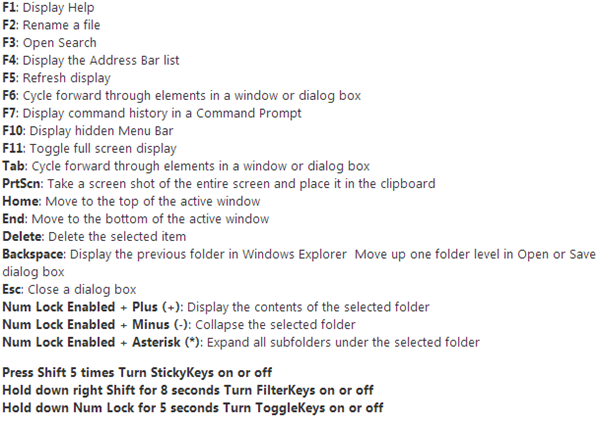
Windows 8 Shortcut Keys


Windows 8 ကိုသံုးေနသူမ်ားအတြက္ Shortcut Keys အခ်ဳိ႕ကို ေဖၚျပေပးလိုက္ပါတယ္.. အသံုးတည့္မယ္ထင္ပါတယ္..
WINDOWS button + C: to show Chames Bar.
WINDOWS + X Button: to display the Advanced Options, Advanced Optimition atu, which will appear Including, Promt Command, Control Panel, and others.
WINDOWS button + I: to display the Hotspot, Speaker, Power, Keyboard.
WINDOWS button + Q: Directing pal for the Menu Search application on Install.
WINDOWS button + D: to return to the Desktop Mode.
WINDOWS button + H: to Share or shared.
WINDOWS button + M: Almost the same as the Windows + D, to return to the Menu Desktop. But if my friend did not run applications in the DAPT minimized to return to the desktop
WINDOWS button + W: to drive my friend to the Menu Search System.
WINDOWS button + F: to the menu File Serach.
WINDOWS + R button: to display the Run dialog box.
WINDOWS button + E: Windows Explorer to display so much faster.
Windows key - Shows the New Metro User Interface (UI) screen

Win + A / Win + Space - Switches keyboard Layouts
Win + C - Brings Start menu with Time and date
Win + D - Shows the Standard Desktop Screen
Win + F - Allows you to search for files
Win + I  – Opens the Settings Sidebar
Win + L - Lock Windows
WIN + O - Applies Rotation Lock
Win + P - Presents with Multi-Monitor options
Win + Q - Lists all Installed applications
Win + W - Instant search for settings.
Win + X - Opens oower user shortcut menu
Win + Y - Desktop Glance
Win + Z - Shows the Application bar in Metro apps,,,,


Functional Keys Shortcuts;—-
Win + F1 - Displays Help
Win + F2 - Rename Item
Win + F3 - Search for files and folders
Win + F4 - Displays items in Active list
Win + F5 - Refresh
Page Up/Down Shortcuts
Win + Page Up - Move Start screen to left Monitor
Win + Page Down - Move Start screen to right Monitor

Number Shortcuts
Win + (1-9) - Switches to the app as numbered on the Taskbar

Arrow Keys Shortcuts
Win + Left arrow- Snaps Desktop Window to left
Win +  Right arrow - Snaps Desktop Window to right
Win +  Up arrow - Maximizes the Desktop Window
Win +  Down arrow - Minimizes or Restores the the Desktop Window

  • Digg
  • Del.icio.us
  • StumbleUpon
  • Reddit
  • RSS

Microsoft Office 2013 Download Full Version 64 bit / 32 bit with Serial Key


Excel 2013. 


Windows 8 Integration

As mentioned before, Office 2013 will only run on Windows 7, Windows 8, or Server 2008 R2 or later. Of especial importance is how this Office Suite will integrate with Windows 8. Microsoft has made a large commitment to the new operating system. This commitment comes from the fact that they are geared to change how Windows works with PCs.
The big move for Microsoft is not Metro, but touch. The touchscreen will change the character of user interaction. Sure at the beginning there will be resistance, but over time users will look at the touch technology as the best thing since sliced bread. Why? Because it will be more natural to use. The keyboard and mouse won’t disappear but they will have their use changed

Businesses and Office 2013

Looking at the upcoming changes from a business perspective, why should a business make the jump to Office 2013? There are some negatives.

1. The upgrade factor. Office 2013 won’t run on the older operating systems, XP or Vista; only Windows 7 or Windows 8. This means that there will have to be a hardware upgrade to stay current.
2. Training. That’s always a hiccup. If users are working with Office 2007, or Office 2010, they can use their current technology skills and upgrade to the new set as needed, not all at once. This should not be a drawback.
3. Upgrades. Companies will have to upgrade, eventially. So why not upgrade to the most current version now? To that end, Microsoft will offer a server-side release of Exchange 2012, SharePoint 2012, and Lync 2012. These programs will provide access to the new collaborative features built into Office 2013. This will be an inducement for IT to not hang back as usual.
 
 
ACTIVATION KEYS FOR BOTH 64/32 BITS ARE:
 46JNH-TM96J-GYW2K-G6C23-8K4C8
Y89N6-KWWJX-YHFVP-DWMGK-XKR9J
MT7NR-6GWBK-QGHBV-2YBFG-72V28

  • Digg
  • Del.icio.us
  • StumbleUpon
  • Reddit
  • RSS