/* Flying Css3 menu www.bloggertrix.com*/
ကိုကို(နည္းပညာ)မွႀကိဳဆိုပါတယ္ ေလ့လာခဲ့သမွ်ကို ျပန္လည္မွ်ေဝတာပါ
RSS

Windows 8 Shortcut Keys


Windows 8 ကိုသံုးေနသူမ်ားအတြက္ Shortcut Keys အခ်ဳိ႕ကို ေဖၚျပေပးလိုက္ပါတယ္.. အသံုးတည့္မယ္ထင္ပါတယ္..
WINDOWS button + C: to show Chames Bar.
WINDOWS + X Button: to display the Advanced Options, Advanced Optimition atu, which will appear Including, Promt Command, Control Panel, and others.
WINDOWS button + I: to display the Hotspot, Speaker, Power, Keyboard.
WINDOWS button + Q: Directing pal for the Menu Search application on Install.
WINDOWS button + D: to return to the Desktop Mode.
WINDOWS button + H: to Share or shared.
WINDOWS button + M: Almost the same as the Windows + D, to return to the Menu Desktop. But if my friend did not run applications in the DAPT minimized to return to the desktop
WINDOWS button + W: to drive my friend to the Menu Search System.
WINDOWS button + F: to the menu File Serach.
WINDOWS + R button: to display the Run dialog box.
WINDOWS button + E: Windows Explorer to display so much faster.
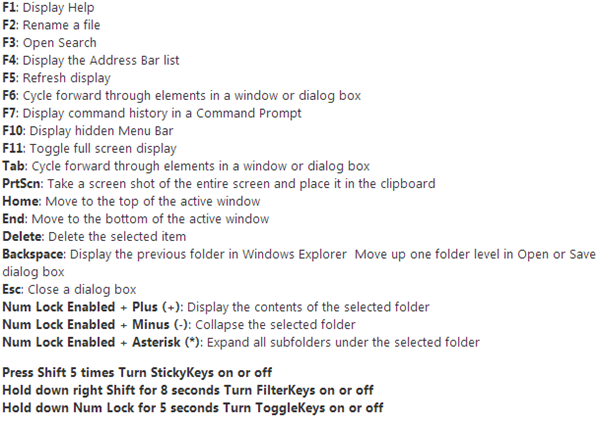
Windows key - Shows the New Metro User Interface (UI) screen

Win + A / Win + Space - Switches keyboard Layouts
Win + C - Brings Start menu with Time and date
Win + D - Shows the Standard Desktop Screen
Win + F - Allows you to search for files
Win + I  – Opens the Settings Sidebar
Win + L - Lock Windows
WIN + O - Applies Rotation Lock
Win + P - Presents with Multi-Monitor options
Win + Q - Lists all Installed applications
Win + W - Instant search for settings.
Win + X - Opens oower user shortcut menu
Win + Y - Desktop Glance
Win + Z - Shows the Application bar in Metro apps,,,,


Functional Keys Shortcuts;—-
Win + F1 - Displays Help
Win + F2 - Rename Item
Win + F3 - Search for files and folders
Win + F4 - Displays items in Active list
Win + F5 - Refresh
Page Up/Down Shortcuts
Win + Page Up - Move Start screen to left Monitor
Win + Page Down - Move Start screen to right Monitor

Number Shortcuts
Win + (1-9) - Switches to the app as numbered on the Taskbar

Arrow Keys Shortcuts
Win + Left arrow- Snaps Desktop Window to left
Win +  Right arrow - Snaps Desktop Window to right
Win +  Up arrow - Maximizes the Desktop Window
Win +  Down arrow - Minimizes or Restores the the Desktop Window

  • Digg
  • Del.icio.us
  • StumbleUpon
  • Reddit
  • RSS

Driver Genius Pro v12 0 0 1211


အားလံုးသိၾကမွာပါ... မိမိကြန္ပ်ဴတာမွာ လိုအပ္ေနတဲ႔ Driver ေတြ Out Of Date ျဖစ္ေနတဲ႔ Driver ေတြကို Auto ရွာေဖြ, ေဒါင္းယူ Update လုပ္ေပးတဲ႔ နာမည္ၾကီး Software ေလးတစ္ခုပါ....  ျပီးေတာ့ Crack ေတြ Patch ေတြ သံုးစရာမလိုပါဘူး Double Click နဲ႔ Install ျပီး အျမဲတမ္းသံုးႏိုင္တဲ႔ Version ေလးမို႔ အားလံုးအတြက္ အေရးထား တင္ေပးလိုက္ပါတယ္....

Driver Genius manages your PC to get 100% up to date Drivers and optimizes PC performance. Driver Genius Professional is a powerful driver manager for Windows that can backup, restore ,search and update your drivers automatically in several mouse clicks!
Driver Genius Professional is a software that backs up and restores drivers.
Drivers Backup: Driver Genius can detect and quickly backup drivers installed in system. It can compress the backup drivers to a zip file, self extracting file or an independent executable auto installer program.
Drivers Restore: You need not install drivers one by one after reinstalling Operating System. Just need only one click you can install all your backup drivers automatically. You can also install drivers in command mode silently. If you need install drivers on multiple PC with the same hardware configuration, Driver Genius can save your much time to reinstall system.
Drivers Update: Are you still using an old version or beta version drivers? Those faulty drivers always cause compatibility problem. They are the biggest hidden trouble that cause system crash. A suitable drivers can upgrade 50% or even more system performance. There are more than 30,000 devices drivers information in Driver Genius Database that including Motherboard, Sound card, Video card, Network card, Modem, Mouse, Keyboard, Scanner, Printer, Digital device etc. All you need to do is one click, Driver Genius will find out all drivers that need updating. All drivers offered are official version or WHQL version, you can use them without any compatibility worries.
Drivers Uninstall: There could be some leftover drivers in your system because of changing hardware or updating drivers. Driver Genius can find out these useless drivers quickly and uninstall them.
LiveUpdate: We update large numbers of drivers on our website. You can synchronize your database with our download server to get the newest version drivers by Liveupdate program.

Click Here to Download
(or)
Click Here to Download

  • Digg
  • Del.icio.us
  • StumbleUpon
  • Reddit
  • RSS

ACDSee15 + Keygen(ဓါတ္ပံု ျပင္မယ္)


ဓါတ္ပံုေတြ Edit လုပ္ဖို႔ပါ.... အဆင္ေျပၾကပါေစ....

Features:
  • Viewing, converting, editing, cataloging, sorting, printing images
  • Supports over 50 different image and multimedia file formats, including JPEG, TIFF, PSD, MP3, MPG, WMV, GIF, WAV, MPEG, MOV, BMP and others
  • Support for a large number of manufacturers of photographic equipment, including Nikon, Canon, Konica-Minolta, Olympus, Fujifilm, Pentax and other
  • Using a variety of effects, filters and tools for editing graphics
  • Support for playback of music and video files
  • A quick search of photos and images
  • A video slide show with customizable audio
  • Add text to photos (titles and descriptions)
  • Using HTML album
  • Support for Unicode
  • The ability to manage Web-viewing presentations by setting the interval between the displays photos in slide show
  • Protection of folders with photos with their synchronization
  • And much more.

Click Here to Download Keygen

  • Digg
  • Del.icio.us
  • StumbleUpon
  • Reddit
  • RSS

Video Rotator 1.0.7 Full Version


မိမိစိတ္ၾကိဳက္ျမင္ကြင္းေတြကို ကင္မရာ..ဖုန္း ေတြအသံုးျပဳၿပီး Video ရိုက္လာၿပီးကာမွ အိမ္ေရာက္လို႕ ကြန္ပ်ဴတာနဲ႕ဖြင့္ၾကည့္လိုက္တဲ့အခါမွာ...ရိုက္လာတုန္းကေတာ့ အတည့္..ကြန္ပ်ဴတာနဲ႕ဖြင့္လုိက္ေတာ့..ျမင္ကြင္းေတြက ေဇာက္ထိုးေပၚလိုေပၚ..ေဘးတစ္ေစာင္းလဲလိုလဲ..
အဲလုိ ၾကည့္ရတာ ကုိ႕လို႕ကန္႕လန္႕ ျဖစ္ေနတ့ဲအျဖစ္အပ်က္မ်ိဳးကို ေတာ္ေတာ္မ်ားမ်ားၾကံဳဖူးၾကမယ္ ထင္ပါ တယ္..ဒီလုိ ျပသနာေတြကို Video Rotator ဆိုတဲ့ Software ေလးကိုအသံုးျပဳၿပီးေျဖရွင္းႏိုင္ပါတယ္..ေစာင္းေနတဲ့ Video ေတြကို ဒီ Software ေလးအသံုးျပဳၿပီး အတည့္ျမင္ကြင္းျဖစ္ေအာင္ ျပန္လည္ျပင္ဆင္ႏိုင္ပါတယ္ခင္မ်ာ..။

  • Digg
  • Del.icio.us
  • StumbleUpon
  • Reddit
  • RSS

Advanced SystemCare Ultimate 6.0.8.289 + AntiBlack List

Advanced SystemCare ခ်စ္သူမ်ားအတြက္ အသစ္ထြက္ Advanced SystemCare Ultimatel 6 with Antivirus ႏွင့္အတူ Black List လုပ္တာကို ကာကြယ္ေပးမယ္..Anti Blacklist ပါတစ္ခါတည္းပူးတြဲတင္ေပးလုိက္ပါတယ္။ Advanced SystemCare Antivirus 2013 ထက္သာလြန္တဲ့ နည္းပညာေတြကိုထပ္မံေပါင္းထည့္ထားၿပီး..အရင္ Version ေတြတုန္းက ရွိခဲ့တဲ့ Error ေတြကိုလည္း ျပန္လည္ျပဳျပင္ထားပါတယ္။ Virus ကာကြယ္ဖုိ႕နဲ႕ စက္သန္႕ရွင္းေပါ့ပါးေနေစဖို႕အတြက္ဆုိရင္ေတာ့..ေတာ္ေတာ္ေကာင္းတဲ့ Software ေလးတစ္ခုဘဲ ျဖစ္ပါတယ္ခင္မ်ာ။
Setup Files ကို Download လုပ္ဖို႕အတြက္ . ဒီကို ၀င္ပါ။ ၿပီးလွ်င္ ေအာက္က ပံုမွာျပထားတဲ့အတုိင္း..
Download ဆိုတဲ့ခလုပ္ေလးကို ႏွိပ္လုိက္တာနဲ႕ Download စတင္ၿပီျဖစ္ပါတယ္။
Patch Files ကိုေဒါင္းရပါမယ္။
အေသးစိတ္အခ်က္အလက္မ်ားကိုေတာ့ Setup Files ကို Download ယူရမယ့္ ဆိုဒ္မွာဘဲဖတ္ေပးပါ။
key လိုခ်င္ရင္ 
CC52B-28CB1-DAF12-A96D6

  • Digg
  • Del.icio.us
  • StumbleUpon
  • Reddit
  • RSS

ကြန္ျပဴတာကို ျမန္ေစမယ့္ နည္းလမ္းမ်ား ...........

 ငါ့ကြန္ျပဴတာအရမ္းေလးေနတယ္ကြာ လို႕ သူငယ္ခ်င္းတစ္ေယာက္က ကြ်န္ေတာ္ ကို လာေၿပာလုိ႕ ကြ်န္ေတာ္ သူ႕အိမ္ကိုလိုက္သြားၿပီး
သူငယ္ခ်င္းရဲ႕ကြန္ပ်ဴတာကိုလိုက္ၾကည့္ပါတယ္၊သူ႕ရဲ႕ကြန္ပ်ဴတာက
 Processor-  Intel(R) Core(TM)2 Duo CPU E7400 @2.80GHz 2.79GHz
 RAM-2.00GB
window7 32-bit
 နဲ႕ၿဖစ္ပါတယ္၊ အေတာ္အသင္႕ေကာင္းမြန္တဲ႕ကြန္ပ်ဴတာလို႕ဆိုႏိုင္ပါတယ္၊ဒါေပမယ့္ တကယ္ကိုေလးေနတာပါ၊လုပ္ေဆာင္ခ်က္အားလံုးေလးကန္
ေနပါတယ္၊အဲဒါကေတာ့ အသံုးၿပဳသူရဲ႕အၿပစ္ပါ temp ဖိုင္ junk ဖိုင္ registry နဲ႕တၿခားမလိုအပ္ေသာဘာဖိုင္ကိုမွ သူမရွင္းလင္းခဲ႕ပါ၊anti-virus ကိုလည္း update
မလုပ္ဘဲထားပါတယ္၊ေနာက္ပီး ၀ယ္ထားကတည္းက Hard drive ကို သန္႕ရွင္းေရးမလုပ္ပါ ဘာဆိုဘာမွ သူမလုပ္ဘဲထားပါတယ္၊ ကြ်န္ေတာ္ သူ႕ကိုအၿပစ္မေၿပာပါ
beginner တစ္ဦးအတြက္ ၿဖစ္တတ္တဲ႕သေဘာေတြပါ၊ကြ်န္ေတာ္တုန္းကလည္းအဲလိုပါဘဲ ..... ဟိဟိ  ကဲ............ ကြ်န္ေတာ္တို႕ ကြန္ပ်ဴတာကို အၿမန္ႏႈန္းၿမင့္ရေအာင္

(၁)Search Indexing Feature ကိုၿပင္ဆင္ၿခင္း

start(window key) ကိုႏွိပ္ computer ကို right ckick ႏွိပ္ Manage ကိုကလစ္ပါ
Manage ေပၚလာတဲ့အခါမွာေတာ့ ဘယ္ဘက္အကြက္ထဲမွ Services and Applications
ကိုေရႊးပါ Services ကိုထပ္ေရႊးပါ၊ထိုေနာက္ ညာဘက္မွ Window Search ကို ကလစ္ႏွစ္
ခ်က္ႏွိပ္ပီး Automatic(Delayed Start) ကို Disabled လုပ္ပီး Apply ႏွိပ္ OK လိုက္ပါ။

(၂)UAC ကိုၿပင္ဆင္ၿခင္း

start(window key) ကိုႏွိပ္ပါ uac လို႕ရိုက္ထည့္ပါ enter ေခါက္ပါ အတံုးေလးကိုေအာက္
ဆံုးအထိ ဆြဲခ်လိုက္ပါ၊massage box တတ္လာလွ်င္လည္း OK ႏွိပ္ေပးလိုက္ပါ
(သတိၿပဳရမွာက-လိုင္စင္ window အစစ္အသံုးၿပဳသူမ်ားမၿပဳလုပ္သင္႕ပါ၊တစ္ေခြတစ္
ေထာင္ crack သမားမ်ားကေတာ့ ၿပသာနာမရွိပါဘူး)

(၃)အသံုးမၿပဳလိုေသာ applications မ်ားကိုပိတ္ထားၿခင္း

start(window key) ကိုႏွိပ္ control panel ကိုႏွိပ္ပါ၊Programs ကိုေရႊးပါ၊Programs and Features
ကိုထပ္ႏွိပ္ပါ၊ Turn Windows Features on or off ကို ကလစ္ပါ၊အဲဒီမွာ ဂိမ္းမွာရွိေသာအမွန္ၿခစ္ေလး
ကိုၿဖဳတ္ပါ၊Media Features ေရွ႕တြင္ရွိေသာ(+)အေပါင္းေလးကိုကလစ္ၿပီးဖြင့္လိုက္ပါ၊Windows DVD
Maker ႏွင့္ Windows Media Center ေရွ႕မွ အမွန္ၿခစ္ေလးမ်ားၿဖဳတ္လိုက္ပါ၊ကဲ.....OKႏွိပ္လိုက္ပါ၊
(သတိၿပဳရမွာက ကြ်န္ေတာ္ၿဖဳတ္ခိုင္းတဲ့ဟာေတြကိုသာၿဖဳတ္တာေကာင္းပါတယ္ က်န္တာေတြက
system နဲ႕ဆိုင္တဲ့အတြက္ မၿဖဳတ္တာေကာင္းပါတယ္)

(၄)Aero Peek and Aero Snap features ကို Disable ၿပဳလုပ္ၿခင္း

start(window key) ကိုႏွိပ္ control panel ကိုႏွိပ္ပါ၊Ease of Access ကိုေရြးခ်ယ္ပါ၊ထိုေအာက္မွ
Ease of Access Center ကိုဖြင့္ပါ ဖြင္႕ၿပီးရင္ေတာ့ Make it easier to focus on tasks ကိုကလစ္ပါ
Prevent windows from being automatically arranged when moved to the edge of the
screen ကို အမွန္ၿခစ္ၿဖဳတ္လိုက္ပါ၊Ok ႏွိပ္ပါ၊ထို႔ေနာက္ right click ႏွိပ္ကာ Personalize ကိုႏွိပ္လိုက္ပါ
ညာဘက္ရွိ Taskbar and Start Menu ကို ကလစ္ႏွိပ္ပါ ထိုေနာက္ use Aero Peek to preview the
desktop ကို အမွန္ၿခစ္ၿဖဳတ္လိုက္ပါ၊Apply ႏွိပ္ OKႏွိပ္ပါ၊

(၅)Hight performance ကိုအသံုးၿပဳၿခင္း

start(window key) ကိုႏွိပ္ control panel ကိုႏွိပ္ပါ၊ System and Security ကိုဖြင့္ပါ၊Power Options ကိုႏွိပ္ပါ
Hight performance ကိုေၿပာင္းလိုက္ပါ၊OK လိုက္ပါ။

(၆)Disable Unwanted System Sounds in Windows7

run box ေခၚပါ (window key +R) window key နဲ႕ R ကိုတြဲႏွိပ္လွ်င္ run box ေပၚလာပါၿပီ
ဒါဆို mmsys.cpl ရိုက္ၿပီး enter ေခါက္ပါ sond ေပၚလာပါပီ ၊sounds ကိုေရြးပါထို႕ေနာက္
windows default ေနရာတြင္ no sound ကို ေရြးကာ Apply ႏွိပ္ပါ။

(၇)Start Up program မ်ားကို Disable လုပ္ၿခင္း

run box ေခၚပါ (window key +R) window key နဲ႕ R ကိုတြဲႏွိပ္လွ်င္ run box ေပၚလာပါၿပီ
ဒါဆို msconfig ကိုထည့္သြင္းၿပီး enter ေခါက္ပါ startup ကိုေရြးပါ ၊antivirus program မ်ားမွ
လြဲရင္ တၿခားဟာ အမွန္ၿခစ္ၿဖဳတ္လိုက္ပါ၊Apply ကိုႏွိပ္ပါ၊OK လုပ္လိုက္ပါ ၊ restart ခ်လိုက္ပါ။

(၈)Softwares မ်ားအသံုးၿပဳၿခင္းၿဖင့္ မလိုအပ္ေသာဖိုင္မ်ားရွင္းထုတ္ၿခင္း

Cclear ေဆာ့၀ဲလ္ကိုအသံုးၿပဳၿခင္းၿဖင့္ မလိုအပ္ေသာဖိုင္မ်ားကိုရွင္းထုတ္ႏိုင္တယ္
ဒီမွာေဒါင္းပါ
Auslogics Disk Defrag ကိုအသံုးၿပဳၿခင္းၿဖင့္ Hard Disk တြင္းဖိုင္မ်ားအစီအစဥ္တ
က်ၿပဳလုပ္ကာ၊ကြန္ပ်ဴတာၿမန္ေစသည္။
ဒီမွာေဒါင္းပါ
antivirus တစ္ခုခုအသံုးၿပဳပါ၊အလကားရတဲ႕ဟာေတြရွိပါတယ္ေကာင္းလည္းေကာင္းပါ
တယ္၊ေနာက္ antivirus တင္ပီးသြားရင္လည္း ဒီအတိုင္းမေနပါနဲ႕ update လုပ္ပါ၊scan
ဖတ္ပါ၊ေန႕တိုင္းမဟုတ္ေတာင္ ၁ လတစ္ခါေလာက္ဘဲၿဖစ္ၿဖစ္ေပါ့ေနာ္
anti-virus ေဆာ့၀ဲလ္ေတြကိုေတာ့ ဒီမွာၾကည့္ပါ...........

  • Digg
  • Del.icio.us
  • StumbleUpon
  • Reddit
  • RSS

Windows Password Remover v7.0 (Admin Password ေမ့သြားရင္


ဟိုေန႔က ကြန္ျပဴတာ လံုျခံဳေစဖို႔ Admin Password ထည့္နည္း/ျဖဳတ္နည္းေလးေရးေပးခဲ့ပါတယ္ .. ျပန္ျဖဳတ္တဲ႔ ေနရာမွာ ေပးထားတဲ႔ Password ေမ့သြားရင္ ျဖဳတ္လို႔မရပါဘူး အဲ့လိုအခါမ်ိဳးမွာ ခုတင္ေပးလိုက္တဲ႔ Software ေလးကို CD (or) USB ထဲကို ဘန္းျပီး Amin Password ကို ျပန္ျဖဳတ္ေပးႏိုင္ပါတယ္ ....

Windows Password Remover v7.0 is a Passware Password Recovery Kit Enterprise image for a bootable CD that resets Windows Administrator passwords.

It supports to reset passwords of all Windows versions, like Windows 7, Windows Vista, XP, 2008, 2003 and 2000, etc.

Features:

# 100% recovery rate
# All passwords are reset instantly
# Windows 7 New!, Vista, Vista SP1 supported
# All Windows Workstations supported
# Resets secure boot options: startup password or startup key disk
# Displays account properties
# Resets local Administrator passwords
# Resets Domain Administrator passwords

  • Digg
  • Del.icio.us
  • StumbleUpon
  • Reddit
  • RSS